Disclaimer: All things I share in this blog post are the fruit of my own labor and separate from my professional work at Cloud Imperium Games. Master Thesis project completed at Hamburg University of Applied Sciences (March 2024). This academic research tool was developed independently as part of my degree program, separate from any professional work.
This is the last part of the Blogposts about cave generator tools in houdini that I made in 2024. In this part I talked more about implementation in Unreal Engine 5. I also conduct small interviews to my friends and let them test it out and gathers feedback from them.
link to Part 1
link to Part 2
Design and Development
Together with Houdini, this thesis uses the game engine Unreal Engine 5.3.2 (and later on 5.4) for its rendering capabilities. Unreal Engine, developed by Epic Games [22], is known for its realistic rendering prowess and is widely used not only for creating video games but also in the film and architecture industries. These rendering capabilities in Unreal Engine enhance the generated cave, making it more believable for the player.
Houdini Digital Asset (HDA) allows Houdini networks to be integrated into Unreal Engine, bringing the functionality of Houdini into the game engine. For this, SideFX also provides comprehensive documentation on how to install and use the plugins in Unreal Engine[23]. This includes an explanation and examples of what kind of data both software understands for them to work correctly.
Before using the tool, users must install the Houdini Engine for Unreal plugin to access the HDA file in the game engine. After plugin installation, users can import the HDA files containing the cave generator into the Unreal Engine’s viewport and begin creating a cave level in Unreal Engine 5. The Houdini Engine session operates in the background, automatically updating the cave environment with each modification made on the HDA tool.

Upon bringing in the cave-generator HDA tool into the Unreal Engine level for the first time, users will get a very short tunnel with an initial curve. This serves as the starting point of the cave generation tool. Users can shape the cave layout by adjusting the curve’s handle or adding new curve nodes, achievable by pressing “alt” on the keyboard and drag-clicking on the end node.
 Figure 23. The initial look of the cave with a short tunnel (left), and the cave after dragging the nodes curve and adding a new node (right). Author’s own image taken in Unreal Engine 5 using Screenpresso [27].
Features and Functionality
Blockout phase and Generation phase
Whenever a user modifies the input, such as creating or moving a curve node, Houdini Engine will try to reprocess them as new input. This creates a bottleneck where users have to wait every time for Houdini to reprocess the cave (20 seconds to 3 minutes, depending on the complexity of the cave). To address this, the tool operates in two phases: the Blockout phase and the Generation phase.
Blockout phase: This phase focuses on rapid iteration for creating cave layouts. The tool will only work until the end of the tool's second stage, where cave layouts are formed using VDB and then output the result to the user. Houdini assigned a temporary material and collision mesh to the cave, returning the preview cave layout back to the Unreal Engine as fast as possible. This way, the user can freely change the layout on blockout mesh and get the changes almost instantly without need to wait for the tool to process them whole (with dressing mesh and final textures) every time a change occurs.
Generation Phase: After finishing the blackout phase, the next stage is the Generation phase. This phase involves a more detailed and time-intensive process, including the addition of noises, convex hull, a cleanup process, and scattering dressing meshes. To assist users in managing their time effectively, the tool shows an estimated time required to generate the complete cave level while on Blockout phase. This estimation is based on the area generated (see Figure 24).

Although there are a lot of other variables needed to get a precise estimation, such as computer performance or hardware specifications, only the generated area will be considered for the calculation in this case. This approach is because the tool’s processing in the third stage is heavily dependent on the generated area, such as adding noise and scattering dressing meshes. The following Table 1 shows the data that were collected in order to get the estimation formula.

From the data, we got the average rate of 263,85. This way, the tool's estimation for the Generation phase is calculated through a simple time estimation formula: Estimation in seconds equals the generated area divided by 263,8 (est = area / 263,8 ). While this calculation is not precisely accurate compared to the actual generation time, it provides a useful guideline for users on the anticipated wait time for cave generation. This helps with time management while developing the level. Once users finish testing the layout in the Blockout phase and are ready for the detailed Generation phase, they can activate the option “generate cave”. This triggers the Houdini Engine to begin the process of finalizing the cave level.
 Figure 25. The cave before (left) and after (right) generation toggle is activated. The author’s own image taken in Unreal Engine 5.
Curves functionalities in Unreal Engine
The Houdini plugin for Unreal provides the tool with functionality for curve manipulation other than just dragging curve handles or creating new curve points. A notable addition of curve functionality in Unreal is that users can add multiple curves to create additional cave exits. The tool will try to merge the curve points when they are within a certain distance from each other (with the exception of end points of the curve). This feature offers more freedom for the user to create a custom layout for the cave.
Moreover, when the option “Add rot & scale attribute” on the HDA UI in Unreal Engine is activated, the tool will use those attributes to manipulate the custom polygons so that users can control over the size and orientation of cave rooms. By using Houdini's scale and orientation information, users can manipulate polygon shapes at each curve handle, enabling unique cave room creation.
 Figure 26. When clicking the plus “+” sign (A) the user can add more curves into the tool while activating “Add rot and scale attribute” (B), the user can rotate and scale the cave layout. The right image is the result when the scales are increased only on the z-axis.
These two additional curves capabilities add into the functionalities that users can be used during the Blocking phase, giving users more freedom when designing a cave layout.
Random Rooms and Networks Options
As already mentioned in the previous chapter, the tool will provide the functionality to procedurally add random rooms and networks into the cave. The user will have the option to activate this functionality by activating Toggle “Random Network” and “Random Rooms” respectively. The procedural network can be customized in terms of the L-system loop levels, scale, and angles. Similarly, the “Random Rooms” feature includes an option to offset the noise pattern, influencing the layout of the rooms.
 Figure 27. The GUI to add Random Networks and Random Rooms (left) and the resulting cave layout after adding that functionality (right).
Materials and 3D Assets
Material and texture preparation, as outlined in Chapter 3, is necessary for creating a realistic cave level. The tool offers two material slots for the cave shell: one for the floor and another for the walls and ceiling. With the vertex colors added into the cave level, not only a simple material will be able to be used in this case, but also a multi-material that uses up to three texture sets.
The dressing meshes are also replaceable. The user will only need to find a more or less the same size replacement for the dressing meshes, and it can be done through simple drag and drop on the mesh slots on the tool’s UI. All textures used in this work are from the Megascans library [24], which offers a wide range of free-to-use, photorealistic textures for Unreal Engine users. From those Megascans textures, an Unreal Engine 5 material asset that works with the tool for both the cave floor, walls, ceilings, and all of the dressing meshes are created.
Lighting
Houdini’s integration with Unreal Engine enables the creation of a lighting placement system. The tool assigns points where lighting should be positioned, and Unreal Engine automatically replaces these points with corresponding lighting entities called Blueprints.
Blueprints in Unreal Engine are a system that is used to create game logic without the need for traditional programming. For example, interactive doors that open automatically can be made using Blueprints. In this work, Blueprints are used to combine a light element with a 3D object and effects so later houdini can use the points that the tool prepared and replace them with the Blueprint reference.
The tool uses two distinct lighting styles to enhance the cave environment:
-
Torch Lighting: The tool searches for suitable empty spaces within the cave to place torch points at specific intervals. These points are then replaced with a Blueprint comprising a standing torch mesh, a spot light entity, and a fire effect. This feature adds a realistic and interactive lighting element within the cave.
- Ceiling Lighting: The tool creates small pockets of openings in the cave ceiling and then places points within these pockets. These points are then replaced with Blueprint assets from Unreal Engine, which include spotlights and glowing spheres. This approach simulates natural lighting coming in from the cave's exterior, adding depth and realism to the environment.
 Figure 28. The torch (left) and the ceiling light (right). Both are Blueprints that is made in Unreal.
Users can choose to deactivate the built-in lighting features, enabling the creation of completely dark caves. Thus making it flexible when users want to add custom light or adding additional atmospheric effects to the cave.
Case Studies
Below, we will be discussing the various ways users can create a cave-level using the cave generator tool in Unreal Engine 5.
Creating a Cave Level
Creating a cave level with this tool is straightforward. Once users have installed the Unreal Engine 5 and Houdini Engine, along with the necessary plugin and data. Users can begin their cave construction using the provided HDA files. The primary interface for cave design in this tool is the curve node handle in the Unreal Engine’s viewport. Users can manipulate this handle to shape the cave's layout. The tool also offers additional features like adding new curves or incorporating random rooms, enabling users to construct intricate cave structures with minimal effort.
When finishing the cave layout, users have to click the “Bake” button on the HDA interface in order to finalize the result. This action tells the HDA to bake all the generated cave elements into Unreal assets, and afterwards disconnecting them from the HDA. At this point, users can still modify the cave, but without the functionalities provided by Houdini.
The creation of a bigger size of a cave, covering more than 10.000 square meters, may require longer processing times, typically ranging from 10 to 15 minutes. To facilitate this, the tool provides users with an estimation of the processing time, allowing users to plan and execute the design in segments. These segments can be merged or reused later.
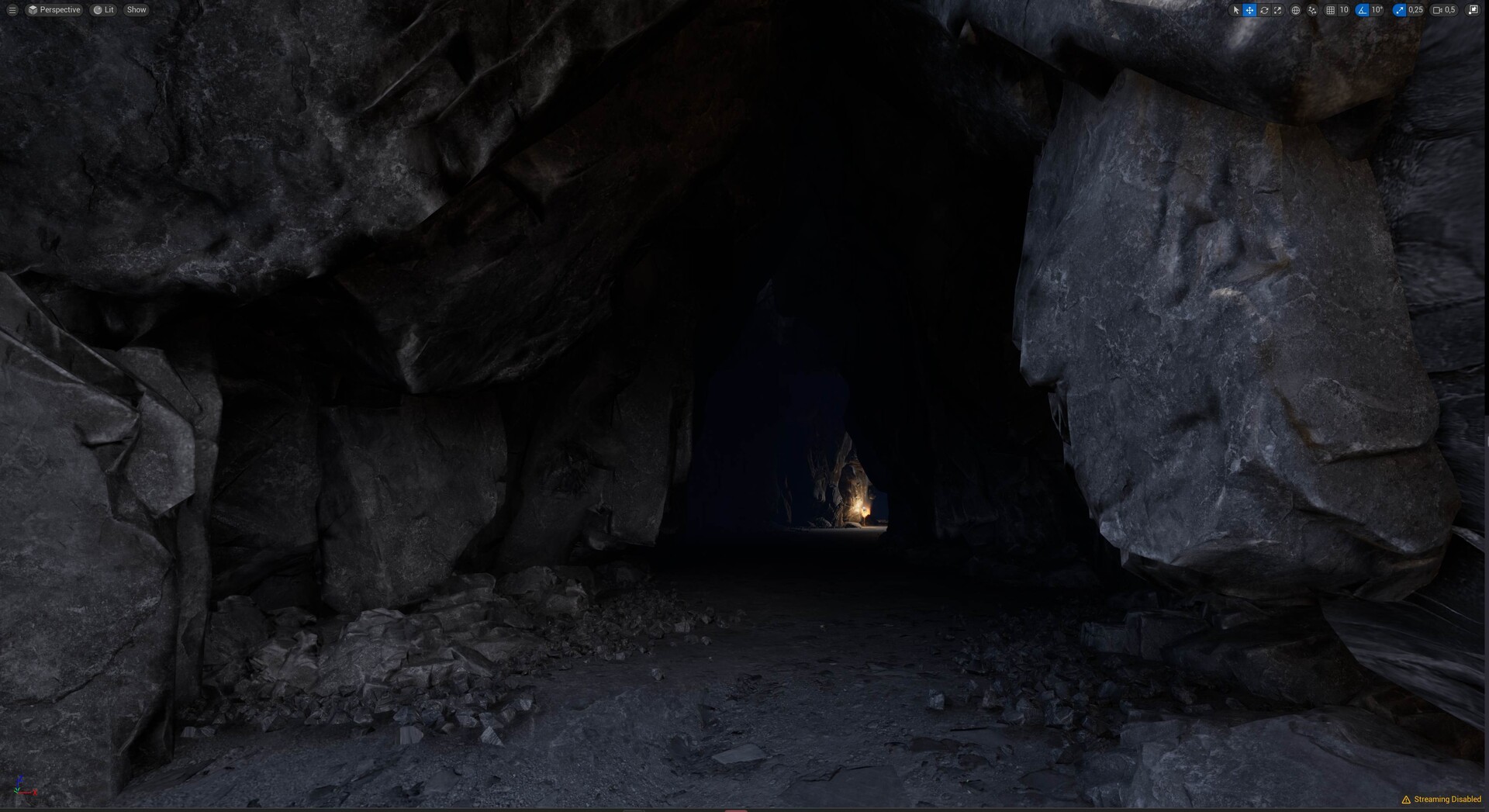 Figure 29. The inside of the generated cave from the tool. The author’s own image taken from Unreal Engine 5 [22].
Creating a stylized Cave
When specific requirements demand it, the generated cave can be altered into a more stylized style. Users can transform the cave’s appearance to match the desired art style by simply replacing materials and dressing assets. Since the user already has the base of the cave level ready, creating another style is a matter of altering finer details, namely the textures and/or dressing meshes.
In order to change the materials of the cave shell, the user needs only to create two materials: wall materials and floor materials. This can be done by going into the Houdini output tab and replacing the old materials with the new one. The same process applies to changing the dressing assets. Importantly, updating the materials and dressing meshes remains possible even after the cave has been finalized or “baked”.
 Figure 30. The stylized cave after replacing its materials on dressing meshes and cave shells. Author’s own image taken from Unreal Engine 5 [22].
Using Megascans assets
Like in the previous case, the resulting cave still has flexibility even after the cave is generated. If the user wants it, they can always change its material and dressing mesh and change it into a completely different biome. The following Figure 31 shows how the cave’s looks and feels were changed into a sandy cave by using the dressing meshes and textures from Megascans.
 Figure 31. Cave with textures and meshes from Megascans. Author’s own image taken from Unreal Engine 5 [22].
While users still can modify dressing meshes, individual customization of each mesh is not possible (refer to previous post). This limitation comes from the nature of the instancing method, which optimizes rendering by treating multiple instances as a single object. However, global adjustments such as changing the position, rotation, and scale of these meshes collectively are still possible. Furthermore, users have the option to add dressing meshes to finalize the cave manually
In summary, the cave generator tool in Unreal Engine 5 offers a comprehensive and user-friendly solution for creating and customizing cave environments, albeit with some limitations. Its integration with Houdini and compatibility with various assets make it a great addition to the tool for game developers and designers.
Result and Evaluation
This thesis discusses the development process of a tool designed for procedurally creating a cave level using Houdini and Unreal Engine 5. The implementation and integration of the tool have gone through evaluations of functionality, customization, and performance. The tool was presented to environmental and technical artists to measure its effectiveness and identify areas for improvement.
Evaluation
The tool demonstrates a robust functionality of creating a believable cave layout, including random and organic elements of a cave, and enabling user customization. By dividing the tool into two parts - Blockout and Generation - it enables the user to design a cave layout iteratively, while fully utilizing Houdini's capabilities.
Functionalities of the tool, which includes adding new curves, scaling and rotating rooms, adding random rooms and networks, make the tool adaptable for various situations and preferences. Users' feedback shows that the tool satisfies the basic functionality desired by most users, though there is a demand for additional features. Users suggested additional functionalities to be implemented, including the ability to add a simple geometry along with the curves input as an “excluding area” so that users can simply choose what area they want to cut off, or an “additional area” where users can define more shapes within them like stairs or pillars. Another improvement would be adding a more responsive curve handle during the Blockout phase to aid in room scaling. Introducing randomization capabilities, such as adding a seed value to noises, could allow users to swiftly shift through multiple cave layouts more efficiently.
Integration with Unreal Engine 5 adds a good level of customization for users, who can easily modify materials, dressing meshes, and the overall art style according to different project requirements. The support of free Megascans textures and assets in Unreal Engine enhances the tool's customization capabilities. However, due to the instancing method implemented, changing individual dressing meshes on a specific position after finalizing the cave is not possible. An additional suggestion is to enable the tool to scatter a wider variety of dressing meshes on walls and ceilings for more diversity.
In terms of performance, the tool went through many evaluations during the Blocking and Generation phases. Feedback from the Blockout phase highlights the tool's ability to provide rapid response, enhancing the user experience. However, a user suggested the need for an even earlier phase before the Blockout phase for quicker response times.
During the Generation phase, users must wait for the tool to complete processing the final appearance. The tool provides an estimated duration for the Generation phase, setting realistic expectations for users. While the estimated processing time is generally considered reasonable, increasing the performance and reducing the wait time is identified as a crucial area for future improvement, particularly in the case of generating larger cave layouts.
Users' feedback shows that the generated cave environments are realistic enough to be directly used in video games. The implementation of a lighting and dressing mesh placement on the generated cave is deemed very successful for adding realism. However, issues such as incorrect normals and a mismatch between smooth cave walls and sharp dressing meshes reduce the realistic visual goals. Furthermore, the created stairs are too big to climb and sometimes impossible to get back up, making the upward traversal in the cave level hard to do.
Conclusion
In conclusion, the developed cave generation tool is a valuable asset for game developers looking to create cave levels in the Unreal Engine 5 environment. The integration of Houdini, with its procedural content generation capabilities, ensures that the generated caves are always unique. The tool’s three-part structure - from creating a layout to merging it all and finally post-processing - offers an effective solution for cave design.
The collaboration between Houdini and Unreal Engine 5, using HDA files, has proven effective. The tool's functionalities and capabilities in creating diverse cave layouts adaptable to user inputs and providing optional procedural elements make it a useful piece of software in level design.
Limitation
While the tool has its own strengths, it has limitations. The processing times in the Generation phase, especially with the large cave layouts, may bring challenges for its user. Future improvements could focus on the performance level where the tool should work more effectively and reduce the waiting time on both the Blockout and Generation phase. Ideally, combining the Blockout and Generation phase into one phase would be an ideal future solution. So that users can review the final look more effectively.
Moreover, boosting the tool with greater customization capabilities could improve its utility. The implemented instancing methods, while reducing the rendering burden on Unreal Engine, come at the expense of flexibility. Creating a functionality that allows users to edit individual dressing meshes after cave generation would be a very useful improvement. The addition of fine tune details of the generated cave environments gives users more creative control.
Thats it :D I plan to visit this tools again in the future, but this is a good point to stop and work on something else.
Thankyou for reading this far!