Cave Generator in Houdini (part 3)

Article / 01 January 2026

Disclaimer: All things I share in this blog post are the fruit of my own labor and separate from my professional work at Cloud Imperium Games. Master Thesis project completed at Hamburg University of Applied Sciences (March 2024). This academic research tool was developed independently as part of my degree program, separate from any professional work.


This is the last part of the Blogposts about cave generator tools in houdini that I made in 2024. In this part I talked more about implementation in Unreal Engine 5. I also conduct small interviews to my friends and let them test it out and gathers feedback from them.

link to 
Part 1
link to 
Part 2


Design and Development

Together with Houdini, this thesis uses the game engine Unreal Engine 5.3.2 (and later on 5.4) for its rendering capabilities. Unreal Engine, developed by Epic Games [22], is known for its realistic rendering prowess and is widely used not only for creating video games but also in the film and architecture industries. These rendering capabilities in Unreal Engine enhance the generated cave, making it more believable for the player.

Houdini Digital Asset (HDA) allows Houdini networks to be integrated into Unreal Engine, bringing the functionality of Houdini into the game engine. For this, SideFX also provides comprehensive documentation on how to install and use the plugins in Unreal Engine[23]. This includes an explanation and examples of what kind of data both software understands for them to work correctly.

Before using the tool, users must install the Houdini Engine for Unreal plugin to access the HDA file in the game engine. After plugin installation, users can import the HDA files containing the cave generator into the Unreal Engine’s viewport and begin creating a cave level in Unreal Engine 5. The Houdini Engine session operates in the background, automatically updating the cave environment with each modification made on the HDA tool.

Figure 22. Graph showing how Houdini, Houdini Engine plugin, Unreal Engine and HDA files works.

Upon bringing in the cave-generator HDA tool into the Unreal Engine level for the first time, users will get a very short tunnel with an initial curve. This serves as the starting point of the cave generation tool. Users can shape the cave layout by adjusting the curve’s handle or adding new curve nodes, achievable by pressing “alt” on the keyboard and drag-clicking on the end node.

Figure 23. The initial look of the cave with a short tunnel (left), and the cave after dragging the nodes curve and adding a new node (right). Author’s own image taken in Unreal Engine 5 using Screenpresso [27].


Features and Functionality

Blockout phase and Generation phase

Whenever a user modifies the input, such as creating or moving a curve node, Houdini Engine will try to reprocess them as new input. This creates a bottleneck where users have to wait every time for Houdini to reprocess the cave (20 seconds to 3 minutes, depending on the complexity of the cave). To address this, the tool operates in two phases: the Blockout phase and the Generation phase.

Blockout phase: This phase focuses on rapid iteration for creating cave layouts. The tool will only work until the end of the tool's second stage, where cave layouts are formed using VDB and then output the result to the user. Houdini assigned a temporary material and collision mesh to the cave, returning the preview cave layout back to the Unreal Engine as fast as possible. This way, the user can freely change the layout on blockout mesh and get the changes almost instantly without need to wait for the tool to process them whole (with dressing mesh and final textures) every time a change occurs. 

Generation Phase: After finishing the blackout phase, the next stage is the Generation phase. This phase involves a more detailed and time-intensive process, including the addition of noises, convex hull, a cleanup process, and scattering dressing meshes. To assist users in managing their time effectively, the tool shows an estimated time required to generate the complete cave level while on Blockout phase. This estimation is based on the area generated (see Figure 24).

Figure 24. The GUI from the tool that tells areas and estimation of time.


Although there are a lot of other variables needed to get a precise estimation, such as computer performance or hardware specifications, only the generated area will be considered for the calculation in this case. This approach is because the tool’s processing in the third stage is heavily dependent on the generated area, such as adding noise and scattering dressing meshes. The following Table 1 shows the data that were collected in order to get the estimation formula. 

Table 1. Calculation of estimation time based on the tests. Table created using  Google Sheets [28].


From the data, we got the average rate of 263,85. This way, the tool's estimation for the Generation phase is calculated through a simple time estimation formula: Estimation in seconds equals the generated area divided by 263,8 (est = area / 263,8 ). While this calculation is not precisely accurate compared to the actual generation time, it provides a useful guideline for users on the anticipated wait time for cave generation. This helps with time management while developing the level. Once users finish testing the layout in the Blockout phase and are ready for the detailed Generation phase, they can activate the option “generate cave”. This triggers the Houdini Engine to begin the process of finalizing the cave level.


Figure 25. The cave before (left) and after (right) generation toggle is activated. The author’s own image taken in Unreal Engine 5.


Curves functionalities in Unreal Engine

The Houdini plugin for Unreal provides the tool with functionality for curve manipulation other than just dragging curve handles or creating new curve points. A notable addition of curve functionality in Unreal is that users can add multiple curves to create additional cave exits. The tool will try to merge the curve points when they are within a certain distance from each other (with the exception of end points of the curve). This feature offers more freedom for the user to create a custom layout for the cave.

Moreover, when the option “Add rot & scale attribute” on the HDA UI in Unreal Engine is activated, the tool will use those attributes to manipulate the custom polygons so that users can control over the size and orientation of cave rooms. By using Houdini's scale and orientation information, users can manipulate polygon shapes at each curve handle, enabling unique cave room creation.


Figure 26. When clicking the plus “+” sign (A) the user can add more curves into the tool while activating “Add rot and scale attribute” (B), the user can rotate and scale the cave layout. The right image is the result when the scales are increased only on the z-axis.


These two additional curves capabilities add into the functionalities that users can be used during the Blocking phase, giving users more freedom when designing a cave layout.


Random Rooms and Networks Options

As already mentioned in the previous chapter, the tool will provide the functionality to procedurally add random rooms and networks into the cave. The user will have the option to activate this functionality by activating Toggle “Random Network” and “Random Rooms” respectively. The procedural network can be customized in terms of the L-system loop levels, scale, and angles. Similarly, the “Random Rooms” feature includes an option to offset the noise pattern, influencing the layout of the rooms. 

Figure 27. The GUI to add Random Networks and Random Rooms (left) and the resulting cave layout after adding that functionality (right).


Materials and 3D Assets

Material and texture preparation, as outlined in Chapter 3, is necessary for creating a realistic cave level. The tool offers two material slots for the cave shell: one for the floor and another for the walls and ceiling. With the vertex colors added into the cave level, not only a simple material will be able to be used in this case, but also a multi-material that uses up to three texture sets. 

The dressing meshes are also replaceable. The user will only need to find a more or less the same size replacement for the dressing meshes, and it can be done through simple drag and drop on the mesh slots on the tool’s UI. All textures used in this work are from the Megascans library [24], which offers a wide range of free-to-use, photorealistic textures for Unreal Engine users. From those Megascans textures, an Unreal Engine 5 material asset that works with the tool for both the cave floor, walls, ceilings, and all of the dressing meshes are created.


Lighting

Houdini’s integration with Unreal Engine enables the creation of a lighting placement system. The tool assigns points where lighting should be positioned, and Unreal Engine automatically replaces these points with corresponding lighting entities called Blueprints.

Blueprints in Unreal Engine are a system that is used to create game logic without the need for traditional programming. For example, interactive doors that open automatically can be made using Blueprints. In this work, Blueprints are used to combine a light element with a 3D object and effects so later houdini can use the points that the tool prepared and replace them with the Blueprint reference. 

The tool uses two distinct lighting styles to enhance the cave environment:

  1. Torch Lighting: The tool searches for suitable empty spaces within the cave to place torch points at specific intervals. These points are then replaced with a Blueprint comprising a standing torch mesh, a spot light entity, and a fire effect. This feature adds a realistic and interactive lighting element within the cave.

  2. Ceiling Lighting: The tool creates small pockets of openings in the cave ceiling and then places points within these pockets. These points are then replaced with Blueprint assets from Unreal Engine, which include spotlights and glowing spheres. This approach simulates natural lighting coming in from the cave's exterior, adding depth and realism to the environment.
Figure 28. The torch (left) and the ceiling light (right). Both are Blueprints that is made in Unreal.


Users can choose to deactivate the built-in lighting features, enabling the creation of completely dark caves. Thus making it flexible when users want to add custom light or adding additional atmospheric effects to the cave.


Case Studies

Below, we will be discussing the various ways users can create a cave-level using the cave generator tool in Unreal Engine 5. 

Creating a Cave Level 

Creating a cave level with this tool is straightforward. Once users have installed the Unreal Engine 5 and Houdini Engine, along with the necessary plugin and data. Users can begin their cave construction using the provided HDA files. The primary interface for cave design in this tool is the curve node handle in the Unreal Engine’s viewport. Users can manipulate this handle to shape the cave's layout. The tool also offers additional features like adding new curves or incorporating random rooms, enabling users to construct intricate cave structures with minimal effort.

When finishing the cave layout, users have to click the “Bake” button on the HDA interface in order to finalize the result. This action tells the HDA to bake all the generated cave elements into Unreal assets, and afterwards disconnecting them from the HDA. At this point, users can still modify the cave, but without the functionalities provided by Houdini. 

The creation of a bigger size of a cave, covering more than 10.000 square meters, may require longer processing times, typically ranging from 10 to 15 minutes. To facilitate this, the tool provides users with an estimation of the processing time, allowing users to plan and execute the design in segments. These segments can be merged or reused later.
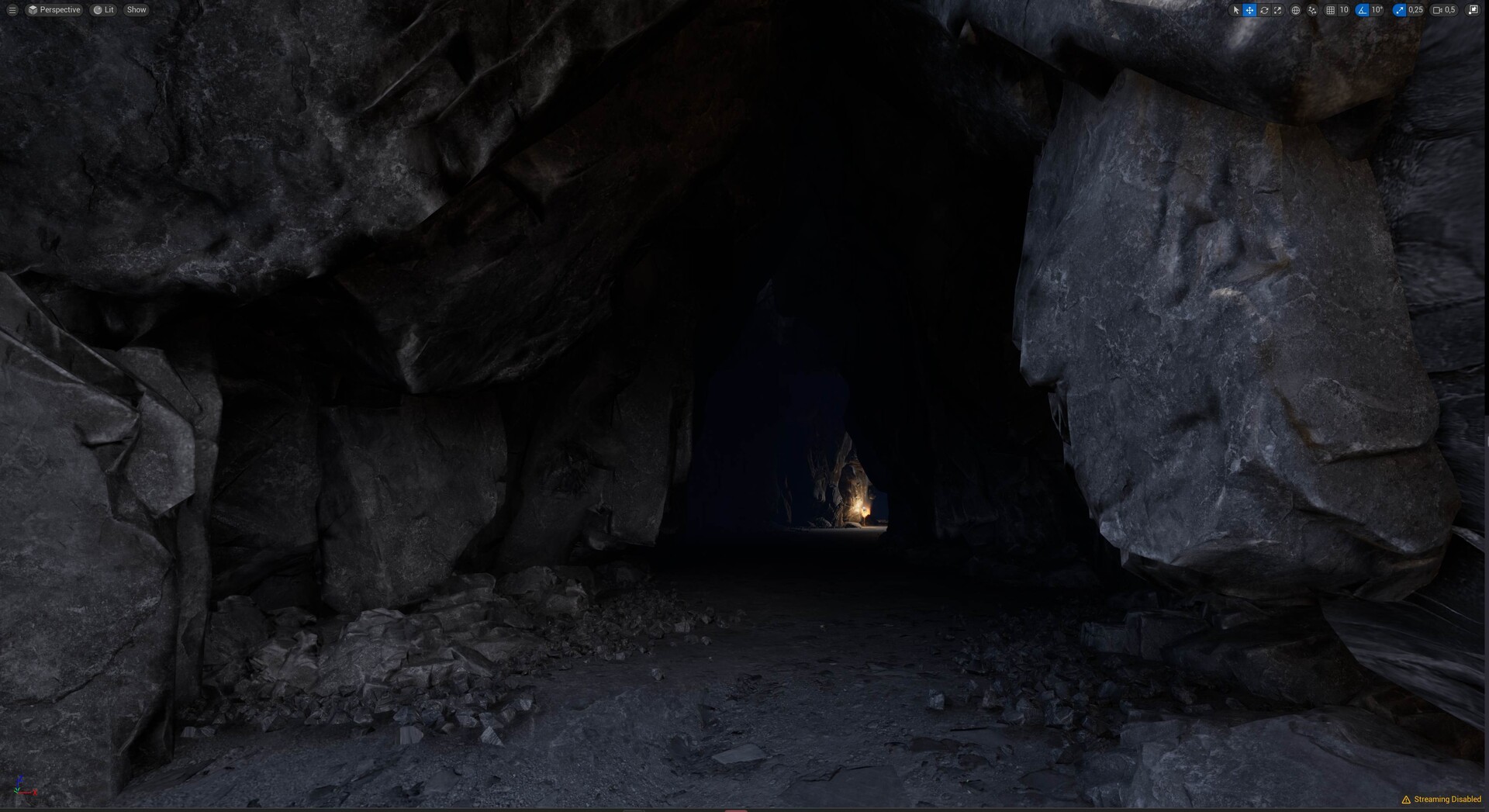
Figure 29. The inside of the generated cave from the tool. The author’s own image taken from Unreal Engine 5 [22].


Creating a stylized Cave 

When specific requirements demand it, the generated cave can be altered into a more stylized style. Users can transform the cave’s appearance to match the desired art style by simply replacing materials and dressing assets. Since the user already has the base of the cave level ready, creating another style is a matter of altering finer details, namely the textures and/or dressing meshes.

In order to change the materials of the cave shell, the user needs only to create two materials: wall materials and floor materials. This can be done by going into the Houdini output tab and replacing the old materials with the new one. The same process applies to changing the dressing assets. Importantly, updating the materials and dressing meshes remains possible even after the cave has been finalized or “baked”.

Figure 30. The stylized cave after replacing its materials on dressing meshes and cave shells. Author’s own image taken from Unreal Engine 5 [22].


Using Megascans assets

Like in the previous case, the resulting cave still has flexibility even after the cave is generated. If the user wants it, they can always change its material and dressing mesh and change it into a completely different biome. The following Figure 31 shows how the cave’s looks and feels were changed into a sandy cave by using the dressing meshes and textures from Megascans.

Figure 31. Cave with textures and meshes from Megascans. Author’s own image taken from Unreal Engine 5 [22].


While users still can modify dressing meshes, individual customization of each mesh is not possible (refer to previous post). This limitation comes from the nature of the instancing method, which optimizes rendering by treating multiple instances as a single object. However, global adjustments such as changing the position, rotation, and scale of these meshes collectively are still possible. Furthermore, users have the option to add dressing meshes to finalize the cave manually 

In summary, the cave generator tool in Unreal Engine 5 offers a comprehensive and user-friendly solution for creating and customizing cave environments, albeit with some limitations. Its integration with Houdini and compatibility with various assets make it a great addition to the tool for game developers and designers.


Result and Evaluation

This thesis discusses the development process of a tool designed for procedurally creating a cave level using Houdini and Unreal Engine 5. The implementation and integration of the tool have gone through evaluations of functionality, customization, and performance. The tool was presented to environmental and technical artists to measure its effectiveness and identify areas for improvement.

Evaluation

The tool demonstrates a robust functionality of creating a believable cave layout, including random and organic elements of a cave, and enabling user customization. By dividing the tool into two parts - Blockout and Generation - it enables the user to design a cave layout iteratively, while fully utilizing Houdini's capabilities.

Functionalities of the tool, which includes adding new curves, scaling and rotating rooms, adding random rooms and networks, make the tool adaptable for various situations and preferences. Users' feedback shows that the tool satisfies the basic functionality desired by most users, though there is a demand for additional features. Users suggested additional functionalities to be implemented, including the ability to add a simple geometry along with the curves input as an “excluding area” so that users can simply choose what area they want to cut off, or an “additional area” where users can define more shapes within them like stairs or pillars. Another improvement would be adding a more responsive curve handle during the Blockout phase to aid in room scaling. Introducing randomization capabilities, such as adding a seed value to noises, could allow users to swiftly shift through multiple cave layouts more efficiently.

Integration with Unreal Engine 5 adds a good level of customization for users, who can easily modify materials, dressing meshes, and the overall art style according to different project requirements. The support of free Megascans textures and assets in Unreal Engine enhances the tool's customization capabilities. However, due to the instancing method implemented, changing individual dressing meshes on a specific position after finalizing the cave is not possible. An additional suggestion is to enable the tool to scatter a wider variety of dressing meshes on walls and ceilings for more diversity.

In terms of performance, the tool went through many evaluations during the Blocking and Generation phases. Feedback from the Blockout phase highlights the tool's ability to provide rapid response, enhancing the user experience. However, a user suggested the need for an even earlier phase before the Blockout phase for quicker response times.

During the Generation phase, users must wait for the tool to complete processing the final appearance. The tool provides an estimated duration for the Generation phase, setting realistic expectations for users. While the estimated processing time is generally considered reasonable, increasing the performance and reducing the wait time is identified as a crucial area for future improvement, particularly in the case of generating larger cave layouts.

Users' feedback shows that the generated cave environments are realistic enough to be directly used in video games. The implementation of a lighting and dressing mesh placement on the generated cave is deemed very successful for adding realism. However, issues such as incorrect normals and a mismatch between smooth cave walls and sharp dressing meshes reduce the realistic visual goals. Furthermore, the created stairs are too big to climb and sometimes impossible to get back up, making the upward traversal in the cave level hard to do. 

Conclusion

In conclusion, the developed cave generation tool is a valuable asset for game developers looking to create cave levels in the Unreal Engine 5 environment. The integration of Houdini, with its procedural content generation capabilities, ensures that the generated caves are always unique. The tool’s three-part structure - from creating a layout to merging it all and finally post-processing - offers an effective solution for cave design.

The collaboration between Houdini and Unreal Engine 5, using HDA files, has proven effective. The tool's functionalities and capabilities in creating diverse cave layouts adaptable to user inputs and providing optional procedural elements make it a useful piece of software in level design.

Limitation

While the tool has its own strengths, it has limitations. The processing times in the Generation phase, especially with the large cave layouts, may bring challenges for its user. Future improvements could focus on the performance level where the tool should work more effectively and reduce the waiting time on both the Blockout and Generation phase. Ideally, combining the Blockout and Generation phase into one phase would be an ideal future solution. So that users can review the final look more effectively.

Moreover, boosting the tool with greater customization capabilities could improve its utility. The implemented instancing methods, while reducing the rendering burden on Unreal Engine, come at the expense of flexibility. Creating a functionality that allows users to edit individual dressing meshes after cave generation would be a very useful improvement. The addition of fine tune details of the generated cave environments gives users more creative control.

Thats it :D I plan to visit this tools again in the future, but this is a good point to stop and work on something else.
Thankyou for reading this far!


Videos - Tool overview


Cave Generator in Houdini (part 2)

Article / 31 December 2025

Disclaimer: All things I share in this blog post are the fruit of my own labor and separate from my professional work at Cloud Imperium Games. Master Thesis project completed at Hamburg University of Applied Sciences (March 2024). This academic research tool was developed independently as part of my degree program, separate from any professional work.


This is part 2 of 3 blog posts
In this part of the article, I will discuss more on the on implementations of the theory on the first post in Houdini.  

link for part 1
link for part 3

Methodology

The previous post discussed the pattern that is found in real caves and they are used for generating cave levels in video games. Additionally, the methods to create cave levels in video games and their related works were explored. This chapter will focus on applying those theories in the development and implementation of the cave generator tool.

This chapter will begin with a brief introduction to the main development environment, Houdini. Afterwards, the implementations of the tool will be discussed in order to gain more understanding on how the cave generator tool is built. 


Houdini

If you dont know what houdini is and want to start using it, I would suggest first check the sidefx tutorial.
The tutorial set by Moeen Sayed and Simon V is also a solid start. For the real implementation between Houdini and Unreal, I used this tutorial

The implementation of the tool is divided into three main stages (as shown in the figure below). The first stage involves building and assembling the polygonal shapes that make a cave. The second stage focuses on merging the polygonal shapes, resulting in one shape. Finally, in the post-processing stage, various improvements such as noise effects on the walls and ceiling, adding vertex colors for textures, UV processing, etc will be applied. This last stage also includes the placement of dressing meshes, ranging from large boulders to small pebbles, in order to improve the cave's realism. The following subsections explains more into details of each of those stages. 

Figure 9. The division of the tool inside Houdini [18]


First Stage: Creating Base Layout of Caves in Houdini 

The initial creation of a cave begins with a simple tunnel from point A to B. The process requires users to guide the construction, with the tool then creating the cave around this guideline. Therefore, Houdini requires at least an input from users before starting to generate a cave in Unreal Engine. The curve was chosen as the primary input in this work because it is the most basic tool representing the path along which the cave will be developed. Users can easily modify a curve path by adding a new point or adjusting an existing one, and the tool will handle the rest. 

Creating a basic tunnel in Houdini is straightforward: by using a curve node to create curves and linking it with a sweep node, users can achieve a tube-like shape based on the curve input (see Figure 10). To facilitate smoother transitions at corners, a resample node is used, making the sweep node function more effectively. The resample node in Houdini recalculates the input curve and creates a new curve with evenly spaced points, which are then used for further refining the cave walls.

Figure 10

On another branch, the copy to points will be used to add polygonal cave like geometries. and lastly they will be merge

Figure 11


This method ensures that the produced cave walls will have the blocky shapes found in rock caves (see the article before this for reference). Additionally, these custom polygon shapes are designed with a flat base, ensuring that the floor of the generated cave remains flat for improved player traversal. This approach also introduces verticality to the cave's design. If a user wants their cave to go upwards or downwards, the floor will form a stair-like structure (see Figure 12), making the cave traversable even on a vertical axis.


Figure 12


Together with the output from the sweep node, the output from this copy-to-points node will be merged. Making sure the cave has an organic layout, while it is also always connected throughout the input. While the tool can create a simple tunnel with a cave-like appearance, it is not enough to meet the project's goals. Additional work is needed to create more complex cave layouts. Thus, methods to merge more shapes into the geometry will be introduced. 

Creating Random Rooms

In order to add more variety than a tunnel-like space, we need to add more variety on the tunnels by adding more "rooms". This creates pockets on the cave that makes it less tunnel-y. These rooms are necessary to avoid repetitiveness in the layout of the cave, and it needs to be intersected with the path of the input curve. 

The process of creating rooms involves putting a grid along the path of the curves. This grid will be the starting point for creating base layouts of the room and will be further processed by using the Cellular Automata or Noise algorithm. Both methods allow us to create random spots representing room layouts. 

I tried the cellular automata first. If you want to know how the implementation goes, you can watch this amazing video by Junichiro Horikawa or by Sebastial League. I got these as a result:

Since I'm using the world positions to calculate where the cellular is at each cell position, the grid can't be rotated. Actually, it still can, but it will need some extra calculation, which making this already expensive room creation more costly. On a bigger grid,s this will cost me some seconds, which in comparison to the next method, which using native noise nodes.

On the other hand, the noise method used the native attribute noise node from Houdini, giving the "patch" of colors. I make a plane-grid based on the curve points: it creates a plane from point a to b, with about 5-10 meters wide (random), then add attribute noise and create room-pocket floors. Other pockets other than in the curved path will be deleted.  

After implementing and testing both methods, the noise method was chosen for its built-in functionality in Houdini and its efficiency compared to the Cellular Automata method.

The tool then uses the extrude node to create room geometries along the input curve's path. These geometries will then be processed in the tool's second stage. Later in the Unreal Engine, users will have the possibility to offset the noise in order to randomize shapes. 

Using L-System for creating extra networks

The tool also utilizes an L-system to create a random network of caves without needing to create many curves. To replicate a “branchwork” pattern (see part 1), the following rules are used with the L-system node in Houdini:

  • Axiom: FA
  • Constant: + - [ ]F
  • Variable: ABCD

  • Rules: A=F[-FFFFB][+FFFFC], B=FF[-FFFFFD][+FFC], C=[-FFFFFD][FFFFF], D=[-FFF][+FFB]

This result in the following curves in houdini:


In order to get an effective result of a branchwork pattern, it is crucial that the created network branches outside of the cave, rather than simply following the curve directions. For this reason, rules that involve a lot of creating branching structures are selected. Additionally, Houdini's L-System node allows for the definition of branch direction angles.

This new network of curves will be placed at every point along the main input curves, creating additional curves within the cave without the need to create new curves manually. 

After the extra network is placed into the input curve pathways using the merge node, it will be treated as part of the original input curve. The network will then be passed into further processing, including going through a resample node and a copy-to-points node. This step is necessary to ensure that the caves, whether created from the main inputs or the L-System, have a consistent layout.

Later in Unreal Engine, users will get the options to change how much loop the network should have, the angle of branching, and the size of the network. This allows users to create complex cave layouts easily.

All these functionalities (adding rooms and extra networks) occur in the first stage of the tool. At the end of this stage, the main tunnel created from the curve inputs, along with random rooms and networks, is merged, resulting in a believable cave layout that mimics real-world caves. Figure 15 shows an example of the merged geometry of the generated cave in this first stage: The gray geometry represents shapes from the input curve, while the red and green parts represent geometries resulting from random room generation and extra networks, respectively.


Second stage: Using VDB functionality to bring all mesh together

Once all of the geometries are combined using a merge node, the cave is ready for further processing. The outputs of main inputs, random networks and random rooms need to be merged together in one interconnected mesh. While Houdini provides a boolean node to unify all the geometries, it often results in less than ideal outcomes such as polygon error or a non-hollow geometry. In order to avoid this, the VDB nodes are used. 

VDB stands for “Volumetric, Dynamic grid that shares several characteristics with B+ trees” [20]. It is one of the Houdini data types that represents voxels, which are essentially a grid of 3D pixels.  The VDB process in Houdini involves transforming the mesh geometry of the cave into a voxel representation. These voxels are then converted back into a polygon mesh for use in game environments. By using these methods, an interconnected one geometry will be created that has the same layout as the merged geometries input from the previous stage. 

One of the advantages of using VDB in this context is that it always produces hollow interior geometries. This is crucial for creating a cave level that is realistic and accessible. This VDB method ensures that the detailed layout of the cave is preserved and also ensures that whatever the shape on the input, it always has a hollow geometry. 


Third stage: Post-processing

In this final stage, the focus will be on refining the cave geometry through advanced post-processing in Houdini. This involves various steps to enhance the cave's overall appearance later in the game engine, Unreal Engine 5.


Adding noise to the cave shape

Even after the basic shape of a cave was achieved, further shaping of the cave shell is necessary in order to get a realistic look. For this purpose, the tool will implement noise on every polygon point, adding a secondary shape on the cave surfaces that complements the blocky shape that was created from the first stage of the tool. 

Before applying noise on the cave surface, the tool will divide the cave further in three sections: floors, ceilings, and walls. This division is needed to ensure that the cave floor remains flat while also helping on the placement of the dressing meshes in the later part of the tool. To achieve this division, the group node will be used. This node has the functionality of grouping a polygon part based on its polygon’s face orientation (normal direction). In this case, floors are defined by upwards-facing polygons, ceilings by downwards-facing ones, and the rest of the surface is defined as cave walls. 

After the division, the noise will be added selectively on the wall and ceilings by using an “attribute noise” node. On this node, Houdini provides its user with many types of noises such as Perlin, Manhattan cellular, Simplex, Worley, etc [21]. The Worley is chosen for this project because of its effectiveness in creating the most cave-like patterns, helping shape the cave into a more organic state.


Cleanup mesh, vertex colors, and convex hull

With the base shape for the cave ready, the cleanup process begins. This includes making entrances and exits by making holes at each end of the main curve, inverting the normals so the polygons face inward, unwrapping UVs for textures, creating Levels of Detail meshes (LODs), and fixing any polygon errors. This is achieved by using various predefined and custom nodes in Houdini.

After finishing all the cleaning up process, the cave mesh needs to be prepared for use in Unreal Engine 5. This includes the painting of random vertex colors on the cave polygons using attribute noise nodes. Adding color attributes into vertices in a mesh is a common method that is used in game development to prevent repetitive looks of a tiled texture. This is done by showing materials through the color mask of the mesh’s vertices. The vertex color applied has to be unique and randomized in order to achieve the purpose of avoiding repetitive textures.

In the example of Figure 18, the three distinct materials (smooth rock, sharp rock, cliff rock) are displayed based on their respective vertex color channels. The smooth rock materials on the red channel, the cliff rock materials on the green channel, and the sharp rock materials on the blue channel. For creating these vertex colors, the tool uses the Worley noise. This is the same noise algorithm used in shaping the cave, ensuring an organic and natural look across the generated cave.


An additional step is creating a convex hull mesh. This mesh is to ensure that the cave receives light only from specific sources, such as the cave's entrances. To simulate a realistic dark cave, it is necessary to add a mesh that covers the entire cave that protects it from external light sources. This is achieved in houdini with the help of a convex hull node. The tool takes the cave shell after merging it in VDB and creates an enclosing mesh around the input. The tool then deletes the parts at the cave's entrances using a Boolean node (see Figure 19).


Scattering Dressing Mesh

The final touch involves placing dressing meshes within the cave, using the completed cave shell as a guide. Since the division of cave shells (ceilings, walls, floor) has already occurred when adding noise, the tool uses this information to place dressing objects based on their locations.

The dressing meshes used in this project are manually created. Using Houdini for creating a base model, these meshes are further sculpted into realistic-looking boulders, rocks, and pebbles using 3D modeling software such as Zbrush and 3ds Max. The resulting dressing mesh includes four large-sized meshes (boulders), three medium-sized meshes (rocks), and two small-sized meshes (small rocks and pebbles). These meshes serve as a default dressing mesh for the tool and can be changed by users later on.


Different parts of the cave have their own dressing meshes that can be placed upon them. The ceilings and walls will have only large-sized meshes, while the floor will have medium and small-sized meshes. These meshes are placed with random rotation and 10-30% scale variations. 

The placement of meshes also requires a balance between not being too sparse, to avoid making the cave feel empty, and not placing too many, which prevents excessive overlap and expensive rendering costs. This is something that the tool will calculate with the help of Houdini nodes' functionalities, explained below.  

Scattering dressing meshes in Houdini starts with scattering points on the cave's geometry using the scatter-align node. This node enables the user to scatter points with a custom spacing value between the points, thus avoiding overlaps when later the tool places the meshes with the help of the copy-to-points nodes. Although some overlap is inevitable, this method is better than scattering points randomly.

On the floor, the tool examines the intersections of the boulders -dressing mesh- on the wall with the floor and creates a mask using the “mask by feature” node (Figure 21.c). The tool will then scatter points around the resulting mask and place the mid-sized meshes based on them. The very same process will be used when placing the small-size meshes using cave shells and mid-size meshes as the starting point for masking (Figure 21.e). This way, we make sure that the dressing mesh placements on the floor will always be in the hierarchical order big to small placement strategy (Figure 21.f).

Figure 21. Illustrating the tool’s scattering methods: initial cave shell (a), placement of big meshes
on ceilings and walls (b), mask creation on the floor (c), distribution of medium-sized meshes (d), mask
creation for small mesh placement (e), and final placement of small meshes (f). The author’s own Image taken
and edited with Screenpresso [27] and Adobe Photoshop [26].

To optimize rendering performance while scattering many dressing meshes in a cave, the tool uses the instancing method. This technique duplicates multiple meshes across various transform points without replicating the full data of each mesh. This saves a lot of memory because the engine is not storing the full details of every dressing mesh being copied, but only the original dressing mesh. In Houdini, for transferring the dressing mesh as an instanced object, the option “Pack and Instance” is needed to be activated on the copy-to-points node. This approach ensures that the tool remains lightweight during rendering in Unreal Engine, even with a high volume of dressing meshes.

After completing the implementation of all cave generation functionalities in Houdini, the tool is ready to be exported to Unreal Engine. For this, Houdini provides a feature to pack all nodes into a single node known as a Houdini Digital Asset (HDA). This HDA encapsulates all operations, workflows, effects, and functions for use in other projects or for sharing with other users. Parameters within the HDA can be exposed for external control, allowing users to customize the effects of the cave tool, including activation parameters for random networks and random rooms. The next chapter will delve deeper into how this cave generator HDA file is utilized in Unreal Engine 5.

next part


Cave Generator in Houdini (part 1)

Article / 30 December 2025

Disclaimer: All things I share in this blog post are the fruit of my own labor and separate from my professional work at Cloud Imperium Games. Master's Thesis project completed at Hamburg University of Applied Sciences (March 2024). This academic research tool was developed independently as part of my degree program, separate from any professional work.

link to 
Part 2 
link to
Part 3 

Hello there!

Here is the tl;dr version of my master's thesis. I feel bad for my past self, who worked on this and didn't get his work published. So, I decided to publish the thesis as blog posts.

I didn't write this as a tutorial of sorts, but more of a sharing of knowledge on what I found while building the tools. I try to keep the format the same as what I write in my master's thesis, but less formal and fewer words. If this can help you in the journey of learning houdini then I would consider this a big success. 

I write this as 3 part blogs. making it more digestible for a short read. hopefully.

The following are the preview of how the final cave will look


Abstract - aka tl;dr

Caves are a common and iconic setting in video game levels, but creating them can be a challenging task. So I try to make a tool that can be used for everyday Unreal Engine user without knowing houdini at all. Users just need to download the hda, download the needed data (mesh and textures), and generate the cave almost instantly. Mind you, in this time PCG wasnt really introduced at all, so my choices was either making procedural tools for houdini or for blender (using geo-nodes). My friend convinced me to choose Houdini, since it's getting popular, so I chose Houdini after that 

In this part of the article, I will discuss more on the theory behind cave generations (like L-system and Noise Algorithm), a bit cave explanations on how caves in the real world are made, and of course, some related works. The other part will focus more on implementations and testing the results.

Keywords: Cave level design, Procedural tools, Unreal Engine 5, Houdini Engine, Environment Generation.


Introduction

Caves in video games are kind of a staple: it's everywhere. but creating the cave level manually will take a lot of time, and often the developer opts for a more automatic - but customizable - approach, which uses procedural techniques. This is where the tools will come in handy: it provide simplicity and great results, customizable and most importantly, consistency

This work will use Houdini and Unreal Engine 5 as its base. Although the tools provided the default textures and mesh, users should be able to customize the look of the cave in the end


Objective

The main goal of this work is to create an easy-to-use tool for Unreal Engine developers to make a cave level using the Houdini engine. The specific objectives are as follows:

  1. Develop a tool that uses the Houdini engine and Unreal Engine to simplify the creation of cave levels in video game development.
  2. The tool should be able to create a realistic level with the natural looks and layouts.
  3. Create functionality for the user that is sufficient for creating cave levels that are comparable to manually created levels. 

The intended users of this work will range from beginner to advanced users. Users won’t need in-depth knowledge of how Houdini works, but basic knowledge of how to operate Unreal Engine 5 will be needed. Specifically, the tool can be used for a wide range of users: a game developer who wants to make a cave level with a realistic style, a level designer who only wants to have a randomized cave layout, an environment artist who wants to have a cave background, etc. Additionally, the tool is also needed to be customizable, so the user can change the generated cave in case the cave-level needs to adapt to a certain art style.


Cave Generation and Related Work 

This chapter explores the correlation between real-world caves and cave levels in video games. We delve into the diversity of real caves, their characteristics, and how they are formed, while also looking into how they can be used for creating a game level. Afterward, we discuss the theoretical framework for the common methods of making a cave-level video game along with related works.

Cave in Video Game

In his essay, Dennis Jerz discusses the correlation between caves and video games. As a non-surface space, a cave represents the unknown in the real world. Historically, caves have been used as shelter, providing a safe space at their entrances. In modern video games, a cave level represents danger, alerting the player that an enemy is lurking and thus making it a common level archetype in video games.

Cave design in video games is a balancing act of creating a space for playing while also maintaining believability. From a playability perspective, a cave level must offer traversable space, optimal lighting for guidance, a diverse layout that avoids repetition, and other essential gaming needs. On the environmental side, the cave needs to have realistic textures, believable cave formations, and elements that can be expected to be found in a cave level, such as stalactites, stalagmites, and rock formations. Of course, all this needs to be in line with the game art style, but the idea is to get the players to realize and immerse themselves, regardless of the art style of the game, that they are in a cave space.

Cave Layout in the Real World

In the real world, there are many cave archetypes, such as littoral caves, primary caves, solution caves, and many more. Sometimes cave types also mix and blend together as a result of years of natural work and geological formation. Although it's exciting to explore multiple types of caves, to maintain the focus of this thesis, I have chosen to concentrate on only one cave archetype: rock caves. Game developers often choose rock caves when creating their first cave level, mostly because they can be seamlessly integrated and built into various in-game environments. The rock cave can be found in lush tropical forests, in snowy mountains hidden behind glaciers, or in dry tundra biomes.


Figure 1: References of rock caves that will serve as inspiration for this work. Photos by Alex Beddows (used within permission)

    On a larger scale, real-world cave formation results from various processes, including chemical reactions between water and limestone, weathering, erosion through water or wind, and the movement of rock plates that create hollow underground spaces [3][4]. Simulating these complex and naturally occurring cave formations within a computer is not plausible in game development. This is because a) the strength of commercially available computers is not enough to simulate naturally created caves, and b) players prioritize more on whether the cave looks believable and less on how the cave was built. So, game developers use techniques and methods that achieve the layout of the cave level that replicates real patterns.

That being said, we can learn about the common patterns of caves in the real world and create a layout that follows those patterns to enhance player immersion. The illustration below shows the common cave formation patterns found in reality:

Figure 2. Common cave patterns observed in the world [5]


Among the patterns above, the “Branchwork” and “Anastomotic” patterns will be used mainly in this work. This is because these patterns have the most chance and potential of creating a unique experience for the player, and also are the most common patterns used in adventure-like games.


Theoretical Framework

In video game design, there are numerous methods for creating cave layouts. In the following section, we will be discussing the techniques that are commonly used for developing a cave level for video games procedurally.

Cellular Automata

Cellular Automata is a mathematical model with many uses in different fields such as cryptography, biology, physics, and geography [6]. These models start with a grid of cells with finite states (e.g., as “on” and “off”), and an input with initial states on the grid. Over time, each cell’s state changes based on its information about the state of the cells in itself and the states of its neighbors.

Below is a simple variation of a popular cellular automaton, “Conway’s Game of Life”.

  • The grid is two-dimensional, and each cell can be in one of two states: “on” or “off”.
  • The neighborhood of each cell consists of its eight immediate neighbors.
  • The rule is as follows: if a cell has two or three live neighbors, it becomes “alive” in the next generation; otherwise, it becomes “dead”.

Figure 3. Example of how cellular automata work. t=0 is the initial state and the input, while t=1
and t=2 illustrate the grid evolution over time. Created using Google Sheets


In t=0, the initial input is a grid of 5x5 with an “alive” state on cells (2,2), (3,3), and (4,3). According to the rules, every cell will change its state from “alive” to “dead” based on its neighbor count. For instance, in “t=1”, the cell (2,2) changes its state to “dead” because its immediate neighbor count is only 1, while the cell (3,2) turns “alive” because it has 3 live neighbors. This process will continue until “t=5”, resulting in a grid filled with “alive” cells.

When it comes to cave generation, the cellular automata method is often used to create a procedural cave layout. By providing a grid (which can be even three-dimensional) with randomized initial states and applying rules with enough iterations, a randomized cave layout is achieved. An example of this method can be observed in Sebastian League’s demonstration of how to create a Dungeon level in Unity on his YouTube channel . Users can change the width and height of the input grids and alsothe  seeds for the controls of creating randomized starting input states. His works, although implemented in Unity, are still possible to do in Houdini, and gave me much inspiration on how to implement cellular automata. Johnson et al. [8] have also published a paper on creating a procedural cave using cellular automata in video games. Their algorithm is efficient and suitable for real-time scenarios. Although their focus is more on the playability of the cave, their work gives me insight on how to use an effective cellular automaton to create cave levels.

Figure 4. Example of how cellular automata work to create a cave-like pattern [6]


L-System

The L-System, or Lindenmayer system, is a mathematical framework used to create natural and complex structures that follow certain rules. It was originally developed by biologist Astrid Lindenmayer in 1968 [9][10]. This system was originally used in the biology field (for example, to simulate growing plants), but it can be used in computer graphics and other fields to create complex structures.

There are many variations of the L-system, but the one relevant to this work is the model designed by Lindenmayer to simulate plant growth. This L-System includes functionality to define branches. Similar to the cellular automata framework, it requires an initial input and has to follow rules on each iteration. The structures will grow into more complex systems in a recursive nature that builds on top of the result from the previous iteration. The model is represented with a string and has the initial input string called “Axiom.” The string itself can have “variables” which can transform into a new sequence of strings based on rules, and “constants” which remain unaltered. 

A simple example of one of the L-Systems: 

  • Axiom: X
  • Constant: + - [ ]
  • Variable: X F
  • Rules: X=F[-X][+X], F= FF

Which produces:

  • t= 0: X
  • t= 1: F[-X][+X]
  • t= 2: FF[-F[-X][+X]][+F[-X][+X]]
  • t= 3: FFFF[-FF[-F[-X][+X]][+F[-X][+X]]][+FF[-F[-X][+X]][+F[-X][+X]]]

In the example above, we see the string quickly grows into a complex set of strings. Translating this result sequence into graphical rules, we can get the model of a plant: for every ‘F’ and ‘X’, draw a line. Everything inside the square brackets (“[” and “]”) represents a new branch, while the plus-minus symbol (‘+-’) is a 20-degree rotation to the left (-) and right (+). Each iteration produces the model represented in Figure 5. a:

Figure 5. a) results of the L-system based on the previous rules. b) cave network that can be
created with L-System [11]


Based on the simple example above, the L-system can also be used to create a cave pattern, specifically the “Branchwork” pattern. With customized rules and enough iteration, a procedural but organic tree-like pattern can be achieved (Figure 5. b). In regards to this work, the L-System is a good addition for creating the procedural layout of caves with minimal inputs.

Noise Algorithm

One of the common methods in video game development to create a cave level is to use a noise algorithm to create a cave. Some sandbox games, such as Terraria and Minecraft, utilize this method in creating cave levels [12][13]. The idea is to create a randomized pattern that can be found on the chosen noise to give the base cave layout. For example, Perlin noise with an increase in contrast can yield the following result that has a resemblance to a cave structure:

Figure 6. Processed Perlin noise that creates a cave-like structure. Created in Substance Designer
[25]

This method works effectively when the noise is combined, for example, by multiplying or subtracting it with other noises in order to mimic the intricate details of caves in the real world. However, the drawback of this method is that the generated result is often unpredictable. The user needs to be able to contain the generated result in some way and follow the guidelines provided by the user. In other words, there's a need to balance the randomness created through this method with the user’s custom-defined inputs.


Related Works

In the world of procedural cave generation for video games, several notable works have contributed to this field. To provide an overview, we will briefly discuss a few works that have influenced the development of this thesis.

Procedural Generation of 3D Caves for Games on the GPU

In their publication, Mark et al. [14] created a procedural tool that builds a cave system in the Unity game engine. Their work includes using an L-system for creating a base layout, followed by using a noise algorithm to carve the cave structure. Lastly, they processed their generated voxel data into a mesh and further shaped it using shader programming. Their methods also use cellular automata to populate the cave network with objects. While this paper has similarities to this work, their result is focused more on creating cave shapes instead of other factors in video games such as playability or environment. The resulting cave, although resembling cave shapes in nature, feels empty and quite repetitive. The lighting in the cave was also not considered in the result. This gave me a lot of inspiration to implement a tool that not only has the playability part but also keeps its focus on believability by integrating non repetitive textures and lighting.

Mathias Thossen’s Cave Generator

Mathias Thossen, a VFX artist at nDreams, created a cave generator using Houdini. His tool uses the L-system to create many branching layouts of the cave and generates spheres along the network with a random scale attribute, later adding stalactites and stalagmites. In his breakdown of the tool, he also researched the main method of creating a cave-like layout before focusing only on using the L-system. The result is a cave tool that works with a landscape. His breakdown article provided many insights into what to look for when creating a cave system in Houdini.

Emily Fung’s Tutorial on scattering rocks in Houdini

Emily Fung, a VFX Artist and a former intern at SideFx, shared a tutorial video on YouTube, where she discusses her methods of creating rock procedurally, efficient rock scattering, and rendering techniques using Houdini’s renderer, Karma. Although her tutorial focuses mostly on rendering in Houdini, her methods of creating rock procedurally and her way of using and creating masks for scattering rocks provided inspiration and valuable insight for this thesis. Especially her method of better scattering rocks based on size is excellent for achieving a realistic rock formation when scattering 3D meshes in Houdini.

John Kunz’s Cave Layout in Houdini

John Kunz also created a cave layout in Houdini. His creation is more for use in Houdini only and not in video games, but he created a quite detailed cave using Houdini with the use of a noise algorithm on volume functions that Houdini provides. The layout resulting from his method shows a successful, detailed cave layout. 

These related works mentioned above provide valuable insights and techniques, yet they may not fully address the challenges and objectives of this work.

next part